
Avaya IP Office Security Certificate Dubai: How to Fix Expired Certificates and Restore Access
Lots of businesses that use Avaya IP Office have problems with security warnings or login issues because their security certificate has expired. When this happens, people who manage the system often have trouble getting into the management interfaces, secure applications, or remote services. This is why it is so important to understand what the Avaya IP Office Security Certificate Dubai is about, so businesses can keep running smoothly.

You need to know why security certificates are used, why they expire, and how to get some so you can have a secure and reliable communication system. If you are looking for a way to fix your Avaya IP Office Security Certificate Dubai problems, this guide will tell you everything you need to know to get access back when a certificate expires.
What Is an Avaya IP Office Security Certificate?
A security certificate is like an ID that proves the Avaya IP Office system is who it says it is. These certificates are necessary for the system parts to trust each other and for communications to be encrypted.
Certificates help keep communications secure between:
- Avaya IP Office Server
- Avaya IP Office Manager
- Web Manager
- One-X Portal
- Softphones and remote users
- Third-party integrations
The certificate keeps data safe when it is being sent between devices and applications, so people who are not supposed to see it cannot get to it. For businesses in this area, taking care of the Avaya IP Office Security Certificate Dubai is important for following security rules.
Why Does the Security Certificate Expire?
Security certificates do not last forever for security reasons. Avaya IP Office identity certificates usually expire seven years after they are installed, and the root CA certificate expires in ten years. For certificates from authorities, this can be as short as one year.
Certificates expire
- Keep security standards up-to-date
- Reduce cybersecurity risks
- Stop certificates from being used in the wrong way
- Make sure encrypted communications are trustworthy
When the time is up, the system may show certificate warnings. Do not let you make secure connections.
Common Signs of an Expired Certificate
If your Avaya IP Office certificate expired, you may notice:
- Certificate warning messages when you log in
- Browser security alerts
- You cannot get into Web Manager
- You cannot log in to the Manager
- Secure service connection errors
- You have problems getting into the One-X portal.
These are signs that the system certificate needs to be renewed or replaced. Sometimes you have to remove a specific expired certificate, like the GlobalSign TLS certificate, using File Manager.
What Happens If You Ignore an Expired Certificate?
If you ignore a certificate, you might have:
- Reduced system security
- Failed secure connections
- Problems with remote access
- User authentication issues
- Compliance concerns
- You might be more vulnerable to cyber threats
Taking care of certificates regularly helps keep business communications secure and working.
How to Check Whether the Certificate Has Expired
You can check the certificate status by:
Option 1: Web Manager
- Log in to Web Manager.
- Navigate to Security Settings.
- Check the certificate validity date.
Option 2: Security Settings Utility
Look at certificate information and expiration details using the security management tools in Avaya IP Office
When you log in to Manager and Web Manager, you will see a warning about the identity certificate expiry along with the number of days left, so you can stay on top of things.
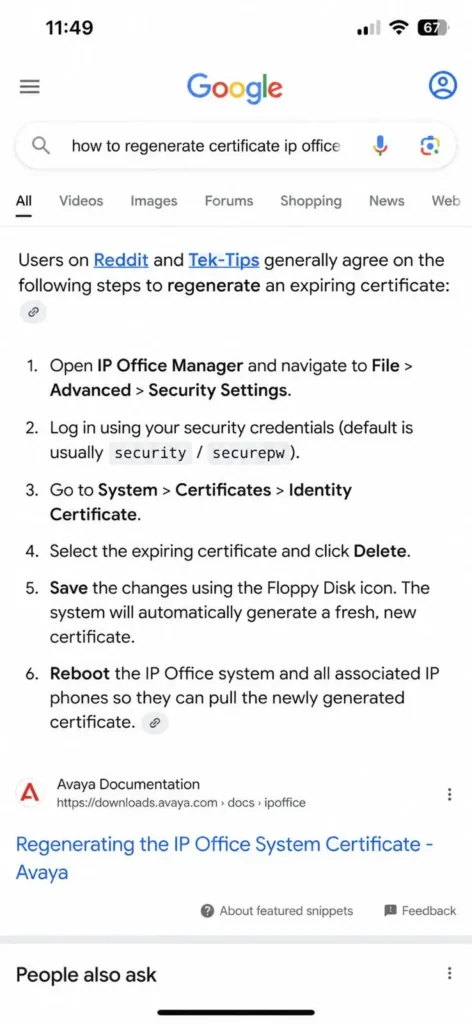
How to Regenerate an Avaya IP Office Security Certificate
When you need to regenerate the Avaya IP Office certificate, follow these steps. Before you make any changes, make sure you have a system backup.
Step 1: Launch Security Settings
Open the IP Office Security Administration utility.
Step 2: Access Certificate Management
Go to the certificate management section. In Web Management, this is usually under Platform Settings.
Step 3: Generate a New Certificate
Choose the option to create or replace a system certificate. For IP500 V2 systems, you can delete the certificate to make a new one. For Server Edition, you can use the “Web Management “Generate and Apply” option.
Important Consideration: If you have problems during regeneration, make sure there are no spaces in the IP address field in the Web Control Page. A space at the end can stop the system from finding the IP address. Cause regeneration to fail.
Step 4: Apply the Certificate
Save the changes. Apply the new certificate to the system.
Step 5: Restart Relevant Services
Depending on how you set it up, you might need to restart some services for the certificate to work.
Step 6: Verify Access
Test:
- IP Office Manager
- Web Manager
- One-X Portal
- Remote user connectivity
Make sure certificate warnings do not appear anymore.
Do You Need Additional Licenses After Regenerating the Certificate?
In some cases, you do not need to buy more Avaya IP Office licenses when you get a new security certificate. The certificate is part of the system’s security framework, not a feature.
However, if you use applications, integrations, or secure remote access solutions, you should check with a certified Avaya partner to make sure everything is compatible and properly licensed. For Avaya IP Office maintenance in Dubai, professional support ensures all licensing and compatibility considerations are properly addressed.
Best Practices for Certificate Management
To avoid disruptions:
- Check certificate expiration dates regularly
- Schedule annual security reviews
- Keep your backups up to date
- Keep IP Office software up to date
- Replace certificates before they expire
- Work with certified Avaya support professionals when you need to
For businesses using IT AMC Service in Dubai or working with an IP Phone supplier in Dubai, coordinating certificate management with your service providers helps ensure everything runs smoothly.
Why Choose Professional Avaya IP Office Support in Dubai?
If you do not manage security certificates correctly, you might have downtime and communication disruptions. Working with Avaya specialists ensures secure implementation, proper certificate management, and minimal business interruption.
For Avaya IP Office certificate renewal Dubai professional support offers:
- Expert certificate troubleshooting and regeneration
- System compatibility verification
- Secure implementation with downtime
- Ongoing maintenance and monitoring
Whether you need certificate regeneration, system upgrades, migration services, or ongoing support, professional Avaya IP Office maintenance Dubai helps keep your communication infrastructure secure and reliable. Contact a Certified Avaya Partner today. Get a free quote for professional support.
Conclusion
An expired Avaya IP Office security certificate can cause access issues, security warnings, and service disruptions. Understanding how certificates work and knowing how to get one helps keep communications secure across your organisation. Taking care of the Avaya IP Office Security Certificate Dubai is a part of keeping your system healthy and secure.
By checking certificate validity and following renewal procedures, businesses can ensure uninterrupted operation and stronger security for their Avaya IP Office environment. Whether you handle certificate management yourself or get support, staying on top of Avaya IP Office Security Certificate Dubai requirements is essential for business continuity. For technical guidance, refer to the official Avaya Support Documentation for comprehensive certificate management procedures.
FAQ
A security certificate helps verify the identity of the Avaya IP Office system and enables secure communication between users, applications, and devices.
Security certificates have a validity period for security purposes. Once that period ends, the certificate expires and must be renewed or regenerated.
An expired certificate may cause security warnings, login issues, browser alerts, or problems accessing management tools and applications.
You can check the certificate status and expiration date through the IP Office Security Settings or Web Manager.
Yes. Administrators can generate a new certificate using the IP Office Security Administration tools and apply it to the system.
In most cases, no additional license is required to regenerate or renew the security certificate.
It is recommended to review certificate validity regularly and renew them before they expire to avoid service disruptions.
Yes. Remote users and integrated applications may experience connection or authentication issues if the certificate has expired.